
Why scattered to‑dos quietly slow teams down
Hidden friction in everyday collaboration
Scattered to‑dos rarely explode into a visible crisis. They show up as slow leaks: repeat questions in chat, “quick pings” to confirm ownership, parallel efforts on the same task. One person tracks work in a notebook, another in a document, someone else in their inbox, another in a spreadsheet. Each system works well enough for the individual, but across a team the picture fragments. Anyone trying to understand progress has to stitch together half‑memories, chat logs, and meeting notes. Time goes into chasing clarity instead of moving work forward.
When responsibility and priorities go fuzzy
In this fragmented state, responsibility becomes slippery. Some tasks are mentioned once in a meeting and then vanish into the void. Others are quietly duplicated because two people think they own them. Work that is actually urgent can stay buried inside a personal list and never surface to the group. Over time, trust in deadlines erodes: commitments feel soft, and people hedge by creating private shadow lists “just in case.” The issue is usually not a lack of effort, but the absence of one shared surface where commitments are explicit, owned, and visible.
Remote work makes the cracks wider
In shared offices, informal chats partly cover for weak systems. You can bump into someone and ask, “How’s that thing going?” or glance at a whiteboard near their desk. Distributed work strips away those casual alignment moments. Without a common workflow everyone can see, misalignment grows quietly: handoffs stall, assumptions diverge, people wait on each other without realizing it. Many remote teams feel “busy but not moving” not because people changed, but because the way information flows never adapted to a more digital, asynchronous reality.
Why one living board changes the dynamic
A single board that holds the work flips the pattern. Personal notes and tools still exist, but anything that affects others shows up on a shared canvas. Tasks are the same, yet the presentation changes from “my pile vs your pile” to “our shared picture.” People can see what is happening now, what comes next, and where work is stuck. This reduces the background noise of chasing updates and raises a quiet sense of stability: everyone knows their place in the whole and how their effort connects with others.
What a simple shared board actually looks like
Columns, cards, and clear states
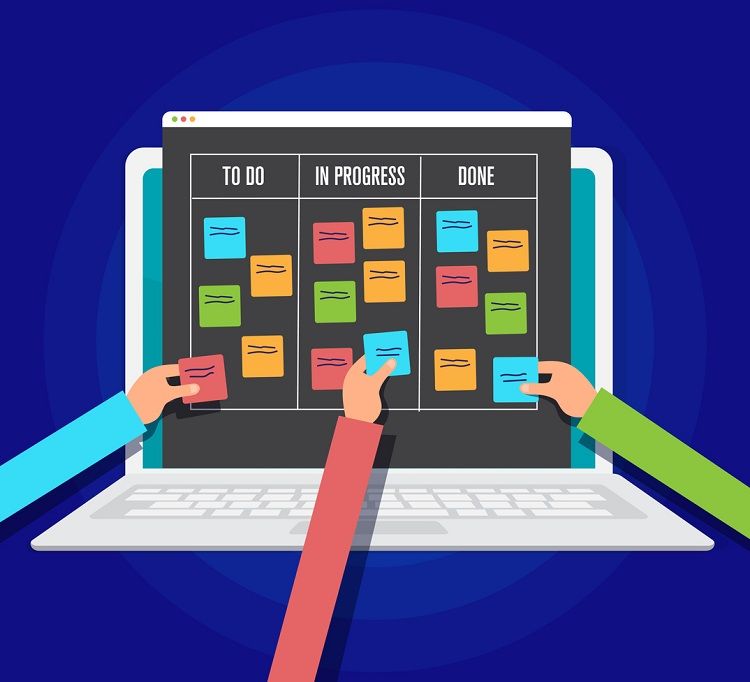
At its core, the board is just columns and cards. Columns represent stages of work such as “To Pick Up,” “In Progress,” “Waiting,” and “Done.” Cards represent specific tasks with a short title, a bit of context, an owner, and a rough time frame. Work progresses by moving cards across columns. This simple structure matters more than fancy features: when status is obvious, people can scan the board in seconds and understand where attention is needed.
Swimlanes and tags for multi‑team clarity
When several projects or teams share a surface, horizontal swimlanes help keep order. Each lane can represent a project, a client, a product area, or a squad. Cards travel within their lane as they move through stages. Tags or color labels add another quick layer: marking urgency, type of work, or risk level. Combined, lanes and tags let people zoom from “how is this one initiative going?” to “what’s on my plate?” without juggling different tools or private trackers.
| Use Case Type | Helpful Board Structure |
|---|---|
| Single small team | Simple columns, minimal tags, no swimlanes |
| Many teams, shared work | Swimlanes by team or project, common status columns, shared tags |
| Heavy cross‑dependencies | Clear “Waiting on others” column, dependency notes on key cards |
| Highly interrupt‑driven | Dedicated lane for quick requests, strict limits on in‑progress |
For each scenario, the board stays lightweight but is tuned to the flow of work, making it easier to read and maintain.
Making dependencies and ownership explicit
Many tasks secretly depend on others: a design before copy, an approval before sending, a fix before rollout. When those links live only in people’s heads, things slip. Writing simple dependency notes on cards (“blocked by X,” “unblocks Y”) exposes fragile points in the chain. Just as important, every card needs a named owner. Multiple contributors can help, but one person is responsible for updates and movement. Without that, cards become orphans and stall in the middle of the board.
Moving from chaos to one clear weekly picture
Gathering the scattered pieces
Shifting from scattered notes to one board starts with a sweep. Each person lists what they are doing and what they promised to do, using whatever is fastest: bullet lists, exported emails, handwritten pages. A small group then merges these into a single set of tasks, removing duplicates and clarifying vague items. Those tasks enter the board in an intake column such as “Collected” or “Inbox,” giving the team its first honest panorama of what actually exists.
Designing just‑enough structure
With the initial cards visible, the group chooses a simple flow. For many teams, three to five stages are enough to start. Over‑designing at the beginning adds friction; the board can evolve. The only real rule: status must be unambiguous. Everyone should be able to point to a card and agree on what that column means. Later, if patterns emerge—say review always causes delay—a new, more precise stage can be added to match reality instead of theory.
Agreeing roles, rules, and weekly rhythm
Because the board is shared, light agreements keep it from turning into a dumping ground. Who creates new cards? Who can change priorities? When is a task allowed into “In Progress”? Who can move something to “Done”? Roles do not need fancy titles: requesters describe the need, doers own execution and updates, coordinators guard focus and highlight bottlenecks. Around that, a simple weekly rhythm works well: a short planning pass, brief check‑ins during the week, and a quick review. In each touchpoint, the board is the agenda, not a side reference.
Everyday habits that keep the board honest
Updating as you work, not as an afterthought
The board only earns trust if it reflects reality. That means updates happen as part of the work, not days later. Starting something? Move the card. Pausing or re‑scoping? Add a note. Finishing? Slide it to “Done” and capture anything others need to know. Treating this as a normal step—like sending a message or saving a file—prevents the painful end‑of‑week scramble where everyone tries to remember what actually changed.
Writing “just enough” detail on each card
Cards need the right amount of detail: too little and others are lost, too much and nobody reads it. A helpful pattern is: clear outcome, short context, key steps. “Refresh landing page” becomes “Improve sign‑ups by updating headline and form; test two new variants.” That single sentence gives direction without swallowing time. Small sub‑tasks or checklists can live inside the card when needed, but the main view stays scannable, even on a laptop screen.
Limiting work‑in‑progress to unlock flow
There is a quiet power in doing fewer things at once. Many boards support a soft cap on how many cards can sit in “In Progress” per person or team. Even if the cap is only an informal guideline, it nudges people to finish started work before starting something new. This reduces constant context‑switching, shortens cycle times, and produces more satisfying moves into “Done.” The board becomes a visible reminder that focus is a shared resource, not an individual preference.
| Habit | Effect on the Board and Team |
|---|---|
| Update cards when work moves | Keeps status fresh, reduces status‑chasing messages |
| Cap active work per person | Prevents overload, improves completion and follow‑through |
| Comment when blocked | Makes problems visible early, invites targeted help |
| Keep titles action‑oriented | Speeds scanning, clarifies ownership and expected outcome |
These small habits compound over weeks, turning the board into a space that “tells the truth” about how work is going.
From tool to team culture
Using the board as the shared language
When a board really takes root, it stops feeling like “a tool” and becomes part of how the team talks. Meetings open by sharing the screen with the board, not a separate slide deck. Decisions are made and immediately reflected as card updates, new items, or changed priorities. Cross‑team discussions revolve around what is visible there, reducing fuzzy debates based only on memory. New joiners quickly sense what matters just by scrolling: where energy is going, who owns what, and how work flows.
Supporting cross‑team collaboration without chaos
Different groups can keep their own styles while still fitting into a common picture. Shared status labels and a few agreed tags give a baseline for alignment, while each team configures its own lanes or custom fields. Linked cards bridge boards when an item spans multiple groups, keeping updates in sync instead of duplicated across places. The result is a network of connected views over the same reality, not a mess of parallel systems that slowly drift apart.
Letting the board evolve with the work
No structure is perfect forever. Periodic short “board clean‑ups” help: archiving old work, merging similar tasks, pruning unused labels. Feedback from everyday users shapes small adjustments—a renamed column here, an added lane there. A brief guide or pinned card outlining “how we use this board” helps new people plug in smoothly. The aim is not constant re‑design, but gentle gardening so the board stays simple, honest, and genuinely helpful as projects and teams change. Over time, it becomes the quiet backbone that turns scattered to‑dos into one steady, shared picture of progress.
Q&A
- How can a Shared Task Board Workflow reduce confusion in a growing team?
A shared task board creates a single source of truth for work items, owners and status, replacing scattered chats and emails so everyone sees priorities, blockers and dependencies in real time.
- Why is Team Project Visibility critical for Weekly Task Prioritization?
Clear visibility into all active projects lets teams compare workload, deadlines and impact, so weekly planning focuses on tasks that truly move key outcomes instead of whoever shouts loudest.
- What makes a Simple Collaboration System more effective than complex tool stacks?
A simple system lowers the learning curve, encourages consistent use and reduces context switching, so people actually log tasks, update status and share information in one predictable place.
- How does Remote Work Coordination benefit from Cross-Team Progress Tracking?
Remote teams need transparent dashboards showing each team’s milestones and risks, enabling asynchronous alignment, timely handoffs and fewer status meetings across departments and time zones.
- What is a Practical Meeting Follow-Up process in this workflow context?
A practical follow-up converts decisions into concrete tasks on the shared board with owners and due dates, then reviews them in the next weekly check-in to ensure real execution, not just talk.